Easily create leads with data from your Information System
We know that no CRM is not the only Information System you use internally, which is why we enable you to easily pre-fill data to create brand new leads inside your lead management software.
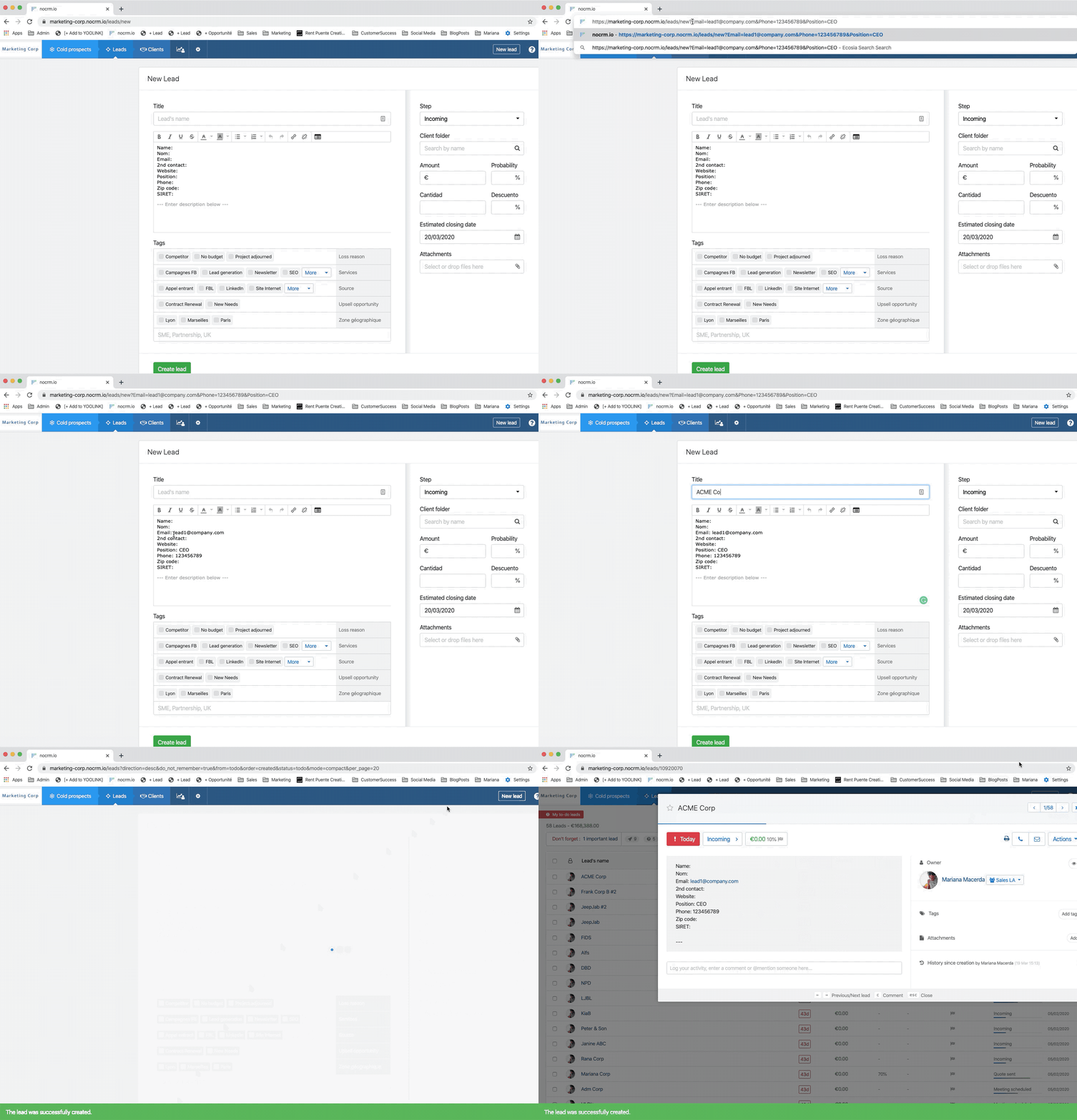
For example, you are in touch with someone on Zendesk and you've identified a business opportunity? Use the "New Lead URL" and add email info, name info, or whatever info you need to the URL to create a brand new lead, will all the data inside.
How does it work exactly?
If the URL of your lead is "https://marketing-corp.propipelines.com/leads/new", add more information to that URL in order to prefill the data you need with a phone, email, or even a tag. Important, the fields added to the URL need to be IDENTICAL to the ones predefined in your account.
For example: e-mail -> &e-mail=lead1@company.com Company -> &Company=ACME
The full URL will look like this: https://marketing-corp.propipelines.com/leads/new?e-mail=lead1@company.com&Phone=123456789&Company=ACME
When doing this, the information will be placed in the corresponding fields of a lead inside no CRM.
⚠️ If you happen to have 2 different Pro Pipe Lines accounts, note that you can use this system to 'transfer' a lead from an account to another. If you have the Expert or Dream Team Edition, you can create new Actions in the lead's Actions menu. One of these accounts could be to create a new lead in your other Pro Pipe Lines account:
